
What will you learn?
Why Website Speed Matters
Website speed affects customer satisfaction, search visibility, and business growth. Visitors often leave slow websites before viewing the content. Search engines also prefer websites that load quickly because they provide a better user experience. Therefore, improving website speed benefits both users and your business.
Key Benefits
- Better user experience
- Higher Google rankings
- Lower bounce rate
- More leads and sales
Better User Experience
Fast-loading pages allow visitors to browse products and services without delays. As a result, users stay longer and explore more pages. A smooth browsing experience also builds trust. This increases the chances of receiving inquiries or sales.
Higher Search Rankings
Search engines reward websites that perform well. Faster pages are easier to crawl and index. In addition, speed supports important ranking signals like Core Web Vitals. Better performance can help your website appear higher in search results.
Test Your Website Performance
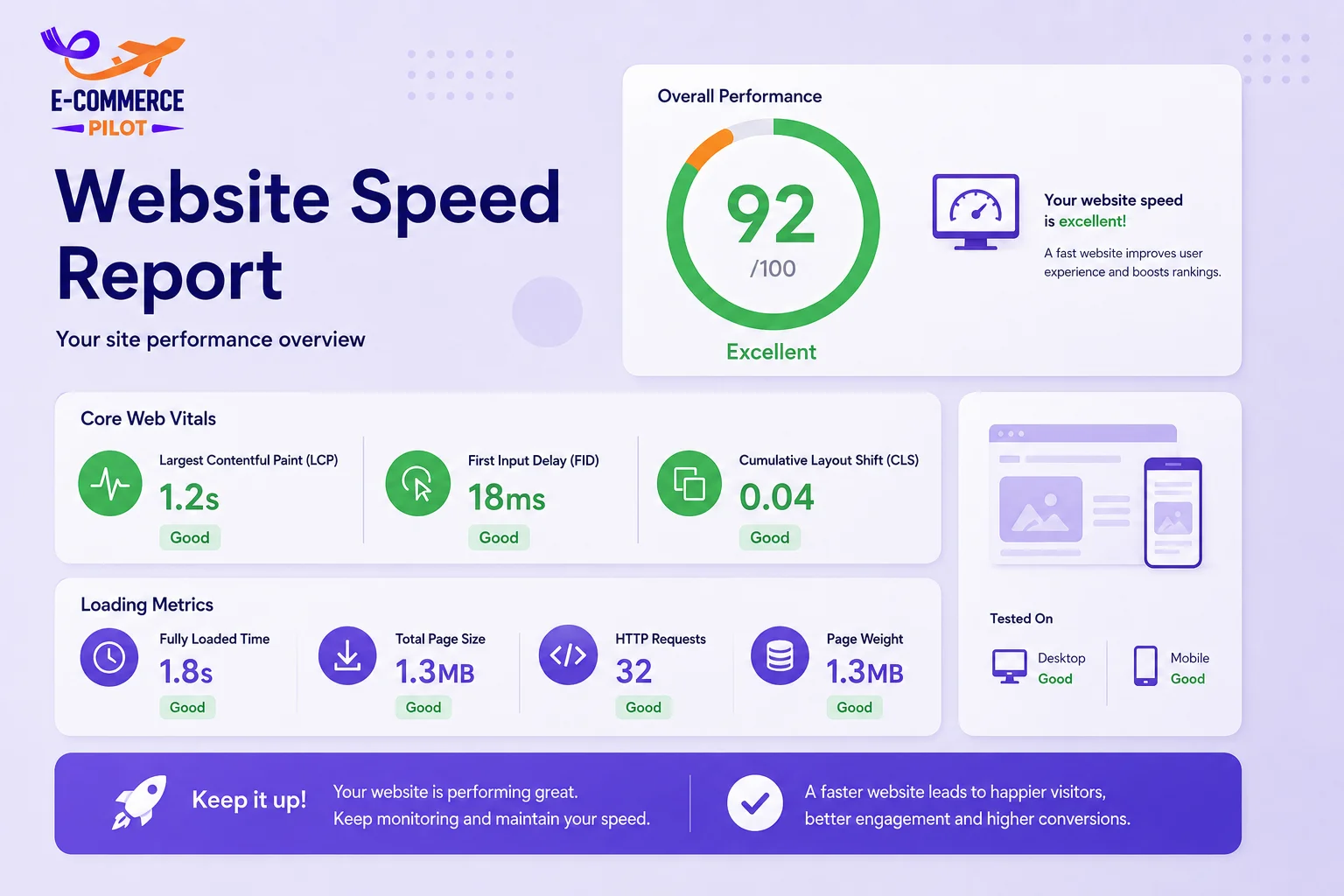
Before making improvements, check your current website speed. Speed testing tools identify loading issues and recommend fixes. This helps you focus on the areas that need attention first. Regular testing also tracks your progress over time.
Check These Areas
- Loading time
- Core Web Vitals
- Mobile performance
- Large files
Use Website Speed Testing Tools
Free tools provide reports about your website’s performance. They identify large images, slow scripts, and other issues affecting loading time. Running regular tests helps maintain consistent performance. Compare desktop and mobile scores for better results.
Review Core Web Vitals
Core Web Vitals measure loading speed, responsiveness, and page stability. Good scores improve user satisfaction and search performance. Review these metrics after website updates. Small improvements can make a noticeable difference.
Optimize Website Images
Images often use the largest amount of page resources. Large files increase loading time and reduce website performance. Compressing images and choosing modern formats improve speed without reducing visual quality. Optimized images also reduce bandwidth usage.
Best Practices
- Compress images
- Use WebP format
- Resize before uploading
- Add lazy loading
Compress Images Before Uploading
Compressed images load much faster than original files. They maintain quality while reducing file size. This improves desktop and mobile performance. It also helps pages load more efficiently.
Use Modern Image Formats
WebP images are smaller than many JPEG and PNG files. Most modern browsers support this format. Smaller images reduce loading time and improve website speed. Using the correct format supports better overall performance.
Improve Website Code
Clean website code allows browsers to load pages more efficiently. Unused plugins, scripts, and large CSS files slow performance. Removing unnecessary resources improves loading speed. Regular maintenance also keeps websites secure and reliable.
Improve Performance By
- Removing unused plugins
- Minifying CSS and JavaScript
- Enabling browser caching
- Using file compression
Reduce Unnecessary Plugins
Too many plugins increase server requests and loading time. Keep only the plugins your website actually needs. Updating active plugins also improves stability. A cleaner website performs better.
Minify CSS and JavaScript
Minification removes unnecessary spaces and characters from website files. Smaller files load faster without affecting functionality. This reduces page size and improves performance. Many optimization plugins perform this task automatically.
Speed Up Mobile Performance
Most visitors browse websites on mobile devices. Therefore, your website should load quickly on every screen size. Mobile optimization improves user experience and search visibility. A responsive website also increases customer engagement.
Use Responsive Design
Responsive layouts automatically adjust to different screen sizes. Users can navigate the website easily on phones and tablets. Faster mobile pages reduce bounce rates. They also improve customer satisfaction.
Reduce Mobile Page Size
Avoid unnecessary animations and large media files on mobile pages. Smaller pages load faster over mobile networks. This improves browsing speed and user experience. Regular testing helps maintain performance.
Monitor Website Speed Regularly
Website performance changes over time as new content and plugins are added. Regular monitoring helps identify problems before they affect visitors. Scheduled speed checks also keep your website competitive. Small improvements made consistently produce better long-term results.
Monitor Regularly
- Page speed
- Broken resources
- Core Web Vitals
- Hosting performance
Common Website Speed Mistakes
Many small businesses ignore website maintenance until performance becomes poor. Large images, outdated plugins, slow hosting, and excessive scripts are common problems. Avoiding these mistakes keeps your website faster and more reliable. Regular optimization saves time and improves customer satisfaction.
Conclusion
Website Speed Optimization is an ongoing process that helps small businesses improve search rankings, user experience, and conversions. By testing performance, optimizing images, cleaning website code, improving mobile speed, and monitoring your website regularly, you can build a faster and more reliable online presence. Consistent Website Speed Optimization will help your business stay competitive in 2026.
Need a faster website? Contact our team today for professional Website Speed Optimization services and give your business the speed advantage it deserves.