
What will you learn?
How Googlebot Crawling Works
Google uses automated crawlers to access web pages and collect information. Googlebot is the crawler associated with Google Search, while other Google crawlers serve different Google products. Google explains that its crawling systems automatically adjust to websites so they can access content without placing unnecessary load on servers.
The basic process starts when Google knows about a URL. It can then request the page, follow available links, and process the information it receives. After crawling, Google may process the page for indexing and later use it as part of its Search systems.
How Google Finds New URLs
Google can find URLs through links, sitemaps, and other known sources. Internal links are especially useful because they connect related pages and give search crawlers paths through your website.
A well-organized website makes important pages easier to reach. Therefore, review your navigation and internal linking structure regularly.
- Add internal links between related pages.
- Include important URLs in your XML sitemap.
- Avoid unnecessary URL variations.
- Link to important pages from relevant content.
Googlebot Crawling and Robots.txt
The robots.txt file gives Googlebot crawling instructions about which areas of a website may be crawled. Google says its automated crawlers check and parse robots.txt before crawling a site, so an incorrect rule can prevent Google from accessing important resources.
However, robots.txt should not be used as a general way to remove pages from Google’s index. Instead, use it when you need to control crawler access to specific resources or sections.
Common Robots.txt Problems
A small robots.txt mistake can block important content. For example, a site may accidentally disallow an entire folder containing product or service pages.
Check these areas carefully:
- Important pages are not accidentally disallowed.
- CSS and JavaScript resources are not unnecessarily blocked.
- The correct user-agent rules are being used.
- Sitemap references are correctly configured.
- Old rules are removed when they are no longer needed.
Improve Your Website Crawlability
Better crawlability starts with a clean website structure. Googlebot crawling works more efficiently when important pages are easy to reach and the server responds consistently.
Additionally, reduce technical barriers that can waste crawl resources. Large websites may need closer attention to crawl budget because Google considers both its available crawling capacity and the site’s crawling demand.
Build a Clear Internal Link Structure
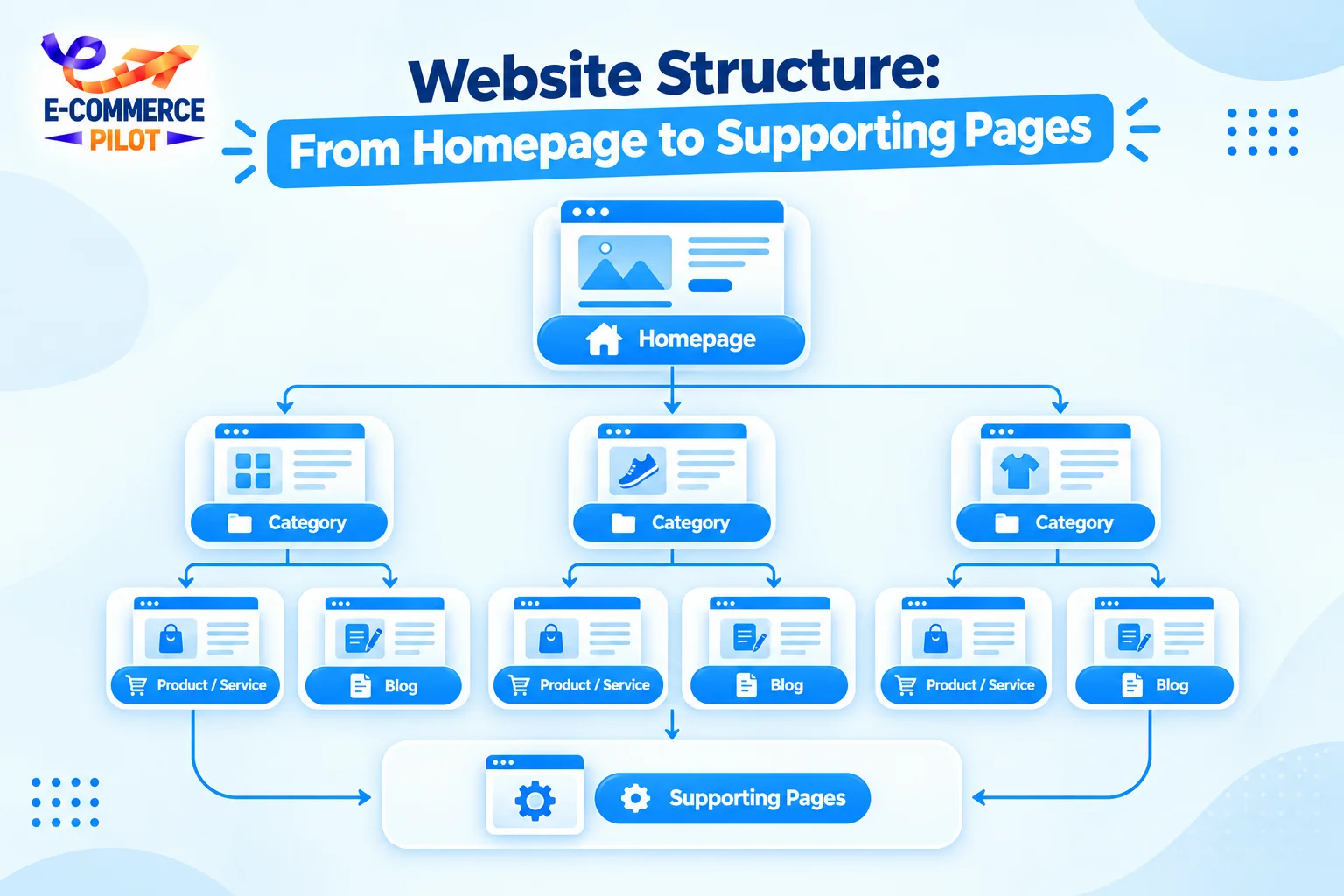
Internal links help Google find related URLs and understand how pages connect. They also help users move between important sections of a website.
For ecommerce websites, connect category pages with relevant products, guides, and supporting content. Likewise, service websites should connect service pages with useful supporting articles.
Use descriptive anchor text and avoid creating large groups of isolated pages.
Keep Your XML Sitemap Clean
An XML sitemap provides Google with URLs that you consider important. It can be especially useful for larger websites or sites with many recently published or updated pages.
Still, a sitemap does not guarantee that Google will crawl or index every submitted URL. Keep the file accurate and include the canonical URLs you want Google to process.
- Remove unnecessary URLs.
- Avoid broken URLs.
- Keep important pages accessible.
- Update the sitemap when content changes.
Common Googlebot Crawling Issues
Crawling problems often come from technical errors rather than content alone. Pages may return server errors, become blocked by robots.txt, contain poor internal links, or create large numbers of unnecessary URL variations.
For example, ecommerce filters can generate many URLs with similar content. If these URLs are not managed properly, they can consume crawling resources without adding much value.
Server and Status Code Errors
Googlebot crawling depends on your server being able to respond to requests. Frequent server errors can affect Google’s ability to access pages consistently.
Check for:
- 5xx server errors
- 4xx errors on important URLs
- Slow server responses
- Redirect chains
- Redirect loops
- Broken internal links
Fixing these problems helps Google access your important content more reliably.
How to Check Googlebot Crawling
Google Search Console provides tools that help website owners investigate how Google sees individual URLs. The URL Inspection tool can help you check whether a page is accessible and whether Google has processed it.
You can also review crawl-related information and server logs when deeper technical analysis is required. For larger websites, log analysis can show which URLs Googlebot requests and how frequently those requests occur.
Use Google Search Console
Start with the URL Inspection tool when you have a specific page that is not appearing as expected. Check whether the URL can be accessed and review any reported issues.
After fixing a technical problem, you can request crawling for a URL. However, Google notes that recrawling and reindexing can take time, so a request does not mean the page will appear immediately.
Final Googlebot Crawling Checklist
A technically clean website gives Google clearer paths to important content. Therefore, include Googlebot crawling checks in your regular SEO maintenance routine.
Use this checklist:
- Check robots.txt rules.
- Submit and maintain your XML sitemap.
- Fix important 4xx and 5xx errors.
- Improve internal linking.
- Reduce unnecessary URL variations.
- Keep important pages accessible.
- Monitor server performance.
- Use Search Console for URL checks.
- Review crawl data when needed.
Conclusion
Googlebot crawling is an important part of how Google accesses website content. While crawling alone does not guarantee indexing or rankings, it gives Google a way to access pages and process their information.
Therefore, keep your website structure clear, maintain your sitemap, review robots.txt, fix technical errors, and monitor important URLs through Search Console. When Googlebot crawling can reach your key pages without unnecessary barriers, your technical SEO foundation becomes easier to manage.
Need help fixing crawling and technical SEO issues? Let Ecommerce Pilot audit your website and build a cleaner SEO structure that helps search engines access your important pages.